
Quick answer: none of the big AI assistants can see your bookings on their own. They can when you connect a trip app that holds them. Today Claude and ChatGPT connect to TripCache and show answers as cards. Grok, Perplexity, Hermes and OpenClaw can connect as custom connectors. Gemini's support is still limited, and Meta's Muse has connectors but no way to add TripCache's link yet.
An AI travel assistant is only as useful as what it can see. Ask a general assistant "when's my flight?" and it will guess, ask you to paste the confirmation, or search your email if you've given it that access. An assistant connected to your trip app answers from the itinerary itself: the flight you actually booked, the hotel you're actually staying at, the car you still have to collect.
Key takeaways
- Planning assistants suggest trips. A connected assistant answers about trips you've booked.
- Every assistant below connects to TripCache the same way: paste one link, approve on your phone.
- Connecting AI assistants is a TripCache Pro feature. Siri on iPhone is free.
AI travel assistant: planning or booking?
Most "AI travel assistant" apps help before you book: where to go, what to see, which hotel. That's useful, and it's a different job. Once you've booked, the questions change:
- When does my flight leave, and from which gate?
- What time is hotel check-in?
- Where do I pick up the rental car?
- How much have I spent so far?
Those answers live in your bookings, not on the web. An assistant can only give them if it's connected to where your bookings are. For the difference in more depth, see AI trip planner vs travel organizer. If you want both kinds in Claude, here are the best Claude connectors for travel, from flight search to the trip you've already booked.
How a connection works
TripCache runs a connector built on the Model Context Protocol (MCP), the open standard that assistants use to reach other apps. You add it once:
- In TripCache, open Profile → AI agents and copy the link.
- Paste it into your assistant's custom connector settings.
- Approve the connection on your phone, and choose whether the assistant may only read or also add plans and expenses.
The full walkthrough for the two most popular assistants is in how to connect ChatGPT or Claude to your trips.
Assistant by assistant
We checked each assistant's own help pages on 29 October 2026. Plans and menus change, so if a step doesn't match, check the assistant's current help page. Each name links to its TripCache setup guide, and the AI agents page lists them all.
- Connects to TripCache?
- Yes, as a custom connector
- Cards in chat
- Yes
- Plan notes
- Custom connectors on all plans; one on Free
- Connects to TripCache?
- Yes, as a custom MCP server with OAuth
- Cards in chat
- Yes
- Plan notes
- Depends on plan; some need Developer mode
- Connects to TripCache?
- Limited
- Cards in chat
- Text answers likely
- Plan notes
- Custom MCP support isn't on every account
- Connects to TripCache?
- Yes, at grok.com/connectors
- Cards in chat
- Text answers
- Plan notes
- Custom connectors need a paid plan
- Connects to TripCache?
- Yes, as a remote connector
- Cards in chat
- Text answers
- Plan notes
- Pro or Max
- Connects to TripCache?
- Yes, as a remote HTTP MCP server
- Cards in chat
- Text answers
- Plan notes
- Self-hosted
- Connects to TripCache?
- Yes, as a remote MCP server
- Cards in chat
- Text answers
- Plan notes
- Self-hosted
- Connects to TripCache?
- Not yet
- Cards in chat
- —
- Plan notes
- Has connectors, but no way to add a remote MCP link yet
| Assistant | Connects to TripCache? | Cards in chat | Plan notes |
|---|---|---|---|
| Claude | Yes, as a custom connector | Yes | Custom connectors on all plans; one on Free |
| ChatGPT (and Dots) | Yes, as a custom MCP server with OAuth | Yes | Depends on plan; some need Developer mode |
| Gemini | Limited | Text answers likely | Custom MCP support isn't on every account |
| Grok | Yes, at grok.com/connectors | Text answers | Custom connectors need a paid plan |
| Perplexity | Yes, as a remote connector | Text answers | Pro or Max |
| Hermes Agent | Yes, as a remote HTTP MCP server | Text answers | Self-hosted |
| OpenClaw | Yes, as a remote MCP server | Text answers | Self-hosted |
| Muse (Meta) | Not yet | — | Has connectors, but no way to add a remote MCP link yet |
Claude
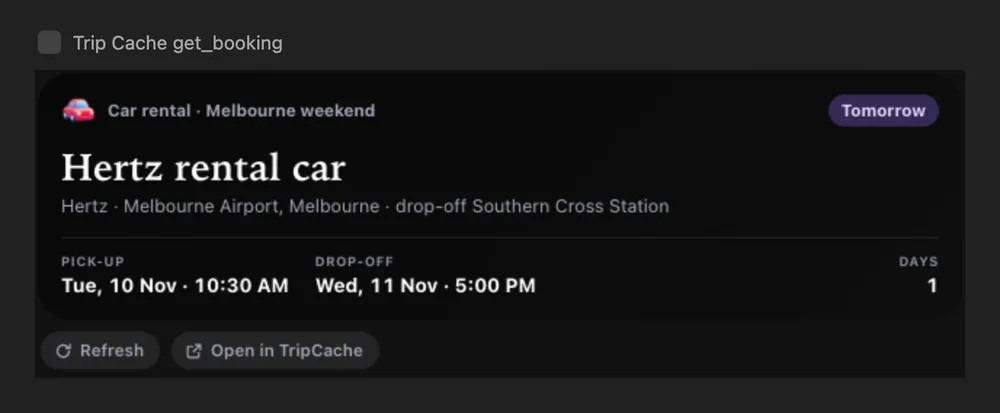
Add TripCache under Settings → Connectors → Add custom connector. Anthropic's custom connector guide lists the plans: Free (one custom connector), Pro, Max, Team and Enterprise. Answers show as TripCache cards: a trip with its days and budget, a flight with its countdown, a hotel or car with its times.
ChatGPT and Dots
Add TripCache as a custom MCP server and choose OAuth. OpenAI ties custom connectors to particular plans, and some accounts must first turn on Developer mode under Settings → Apps → Advanced settings. Dots, ChatGPT's always-on agents, use the same connectors.
Gemini
Google's consumer Gemini app has started offering custom connections to MCP servers, but not every account has the option yet, and Google hasn't published a full help page for it. If you have it, TripCache's link works the same way; expect some answers as plain text rather than cards. Gemini on Android phones is a separate question; TripCache's Android support for it is still being built. Full steps: connect Gemini to TripCache.
Grok
xAI's connector docs say to open grok.com/connectors, choose New Connector → Custom, and enter the server link. Custom connectors are for paid Grok plans. Full steps: connect Grok to TripCache.
Perplexity
Perplexity lets Pro and Max subscribers add a custom remote connector from Settings → Connectors. Paste the TripCache link and choose OAuth sign-in. Full steps: connect Perplexity to TripCache.
Hermes Agent and OpenClaw
Both run on your own computer or server. Add TripCache as a remote MCP server in their configuration. The first request opens TripCache sign-in; approve it on your phone. Setup guides: Hermes and OpenClaw.
Muse
Meta's Muse has connectors for services on Meta's list, and it can build a custom connector from a service's API details. Meta doesn't describe a way to add a remote MCP server link with sign-in, which is how TripCache connects, so Muse can't reach your TripCache trips yet. See Muse and TripCache.
What to ask an AI travel assistant about your bookings
The same questions work in every connected assistant:
- "When's my next flight?"
- "What gate is my flight to London?"
- "Show my Tokyo trip."
- "When do I check in at my hotel?"
- "Where do I pick up the car?"
- "How much have I spent on food this trip?"
- "Add dinner at 7:30 pm Friday to my Melbourne trip." (needs the add permission)
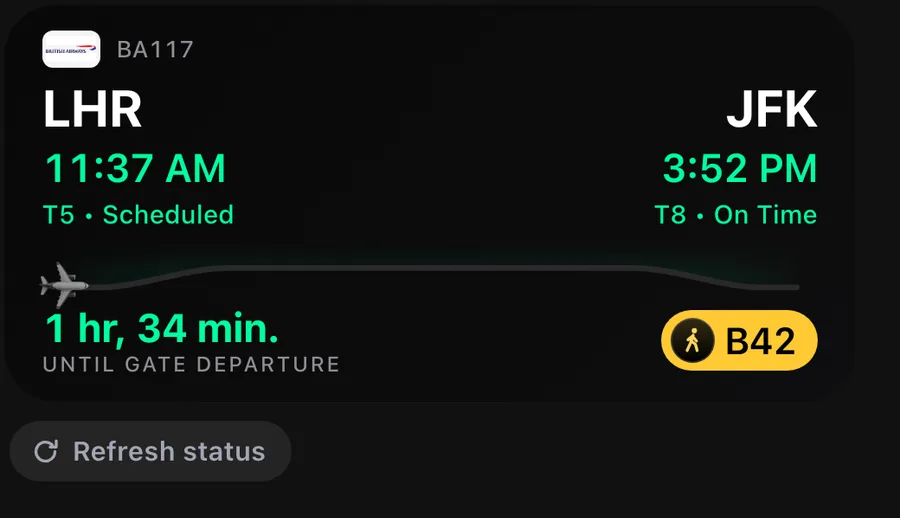
Answers come from TripCache, so they're as good as the trip in TripCache. Bookings get there when you forward confirmation emails or add them yourself. Live gate and delay changes need flight tracking, which is part of Pro.
Privacy: what you're sharing
- The assistant only sees TripCache. Connecting doesn't give it your inbox, photos or other apps.
- Some fields never leave TripCache: booking notes, confirmation numbers and booking prices. Documents show as names and types, not files.
- You can revoke any assistant from Profile → AI agents. Access is checked on every request, so the next one fails.
- The assistant's own policies apply to what you type in its chat. Check each provider's data settings if that matters to you.
Conclusion
An AI travel assistant that knows your bookings isn't a new app. It's the assistant you already use, connected to the place your trip lives. Claude and ChatGPT do this best today, with cards that show the answer at a glance. Grok, Perplexity and self-hosted agents work too, mostly in text.
Coming from TripIt? It has no assistant connector; see does TripIt work with Claude or ChatGPT?
If you want the iPhone version without a subscription, ask Siri about your flight: it's free and works from the lock screen. To get started, download TripCache and see what Pro includes.
Frequently asked questions
Is there an AI assistant that knows my travel bookings?
Yes, if you connect one to the app that holds your bookings. Claude and ChatGPT can connect to TripCache and answer from your saved flights, hotels, cars and expenses. Grok, Perplexity, Hermes and OpenClaw can connect too. Connecting needs TripCache Pro.
Can Gemini see my flights?
Not from TripCache yet, on most accounts. Google's consumer Gemini app is only starting to offer custom MCP connections, and the option isn't on every account. If yours has it, you can add TripCache's link, but expect text answers rather than cards. Gemini support on Android is still being built.
Does Grok work with travel apps?
Yes, through custom connectors on paid Grok plans. Open grok.com/connectors, choose New Connector and Custom, and paste the app's link. For TripCache, copy the link from Profile, then AI agents, and approve the connection on your phone.
Can Meta's Muse connect to TripCache?
Not yet. Muse has connectors, including custom ones built from a service's API details, but Meta doesn't describe a way to add a remote MCP server link like TripCache's. TripCache already uses the open MCP standard, so it can work with Muse once that's possible.
Which AI assistant is best for managing a booked trip?
Claude or ChatGPT, connected to your trip app. Both support custom connectors and show answers as cards, so a flight question returns the route, times, gate and countdown at a glance. Other assistants can connect too but mostly answer in text.
Is it safe to connect an AI assistant to my travel bookings?
It depends on what the app shares and how you control it. TripCache asks you to approve each assistant on your phone, lets you choose read-only access, never shares booking notes, confirmation numbers or booking prices, and lets you revoke an assistant at any time.