
Quick answer: no, not officially. As of 2 November 2026, TripIt has no connector in Claude's directory, no app in ChatGPT and no MCP server of its own. TripIt's help centre also says its public API is no longer available for new integrations, so nobody can build a proper one on top of it either. If you want Claude or ChatGPT to answer from your own bookings, you need a trip app that runs its own connector. TripCache is one: you add it to Claude or ChatGPT, approve it on your phone, and ask "when's my next flight?"
Key takeaways
- There's no official TripIt connector, ChatGPT app or MCP server. We checked Claude's connector directory, ChatGPT's travel apps and TripIt's own help centre and blog.
- Community workarounds exist, mostly reading TripIt's calendar feed. They see dates and titles, not your bookings.
- TripCache has its own MCP connector for Claude and ChatGPT (and Gemini, Grok, Perplexity and self-hosted agents). It needs TripCache Pro.
- No connector here books or pays for travel. They answer questions about trips you've already booked.
Why people search for a TripIt connector
Claude and ChatGPT got good at travel questions in 2026, and both now take connectors: small links that let the assistant read data from another app. Booking sites were first in. Anthropic's everyday connectors launch brought Booking.com, Tripadvisor and Viator into Claude, and ChatGPT's apps started with Expedia and Booking.com.
Those connectors help you search and plan. They don't know what you've already booked. TripIt users, who keep every confirmation in one itinerary, reasonably want the next step: "Claude, what time is my hotel check-in in Lisbon?" answered from their own trip. That needs a connector from the app that holds the trip.
What TripIt offers today
Here's what we found when we checked on 2 November 2026:
- What it shows
- No TripIt connector in Claude's connector directory, which does list travel companies such as Expedia, Booking.com and Tripadvisor
- What it shows
- No TripIt app. Travel apps there are booking and planning tools such as Expedia and Booking.com
- What it shows
- None from TripIt
- What it shows
- Closed to new integrations, according to TripIt's help centre. Existing connections keep working
- What it shows
- Apple Intelligence features for TripIt Pro on iPhone (April 2026): turning unfiled items and photos or PDFs into plans. Nothing about Claude or ChatGPT
| Where we looked | What it shows |
|---|---|
| Claude connectors | No TripIt connector in Claude's connector directory, which does list travel companies such as Expedia, Booking.com and Tripadvisor |
| ChatGPT apps | No TripIt app. Travel apps there are booking and planning tools such as Expedia and Booking.com |
| MCP server | None from TripIt |
| TripIt's API | Closed to new integrations, according to TripIt's help centre. Existing connections keep working |
| TripIt's own AI news | Apple Intelligence features for TripIt Pro on iPhone (April 2026): turning unfiled items and photos or PDFs into plans. Nothing about Claude or ChatGPT |
TripIt could add a connector later. If it does, we'll update this page.
The workarounds, and their limits
Paste your itinerary into the chat
Copy a trip from TripIt, or forward yourself the confirmation, and paste it into Claude or ChatGPT. It works for one question. The assistant only knows what you pasted, and it goes stale as soon as a flight changes.
Use TripIt's calendar feed
TripIt has a read-only calendar feed you can subscribe to in Apple, Google or Outlook Calendar. TripIt says calendars refresh it anywhere from every 15 minutes to once a day. Some community tools read that feed; for example, there's an unofficial "tripit-calendar" skill on ClawHub for the self-hosted OpenClaw agent. Keep in mind:
- The feed URL works like a password. Anyone with it can read your trips, so a tool that stores it needs to keep it secret. ClawHub's own security review of that skill says the same.
- A calendar feed is a summary. It carries dates, times and titles, not hotel check-in times, rental car pick-up desks or what you've spent.
- None of it is from TripIt, so it can break when TripIt changes the feed.
Automation tools
A few no-code automation services list a TripIt integration. These run workflows, such as "when a trip is added, post a message". They aren't a way to chat with your trips in Claude or ChatGPT.
What a trip connector can do
A connector made by the trip app itself knows the full booking, not a calendar summary. With TripCache connected, you can ask Claude or ChatGPT:
- What comes back
- The flight with times, gate and status
- What comes back
- The hotel with check-in and check-out times
- What comes back
- The rental car with pick-up and drop-off
- What comes back
- Expenses by category against your budget
- What comes back
- The plan, added to the trip, if you allowed it to add things
| Ask | What comes back |
|---|---|
| "When's my next flight?" | The flight with times, gate and status |
| "Where am I staying in Lisbon, and when's check-in?" | The hotel with check-in and check-out times |
| "Where do I pick up the car?" | The rental car with pick-up and drop-off |
| "How much have I spent on this trip?" | Expenses by category against your budget |
| "Add dinner at 8 pm on Friday to my Lisbon trip" | The plan, added to the trip, if you allowed it to add things |
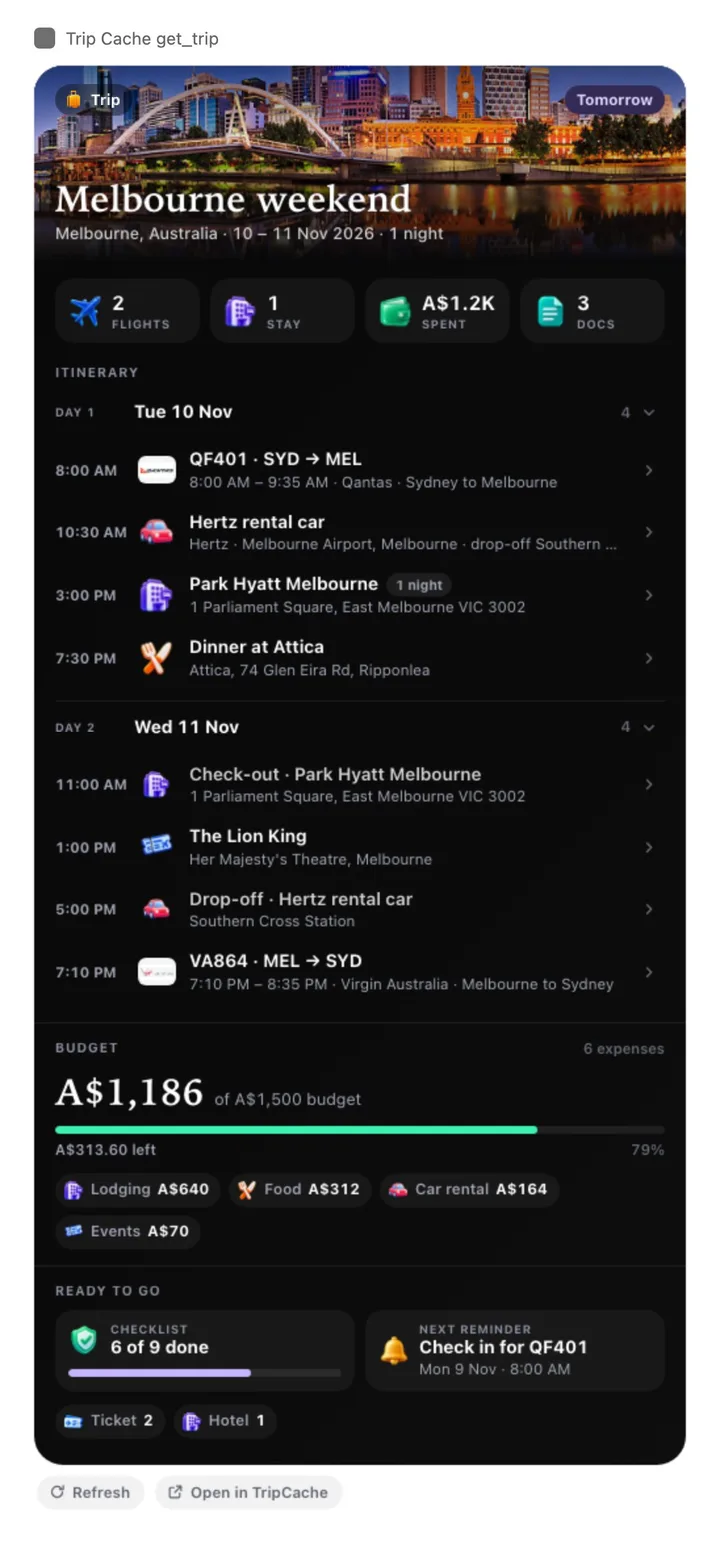
In Claude and ChatGPT, answers come back as cards drawn like TripCache's widgets. Other assistants get the same facts as text.
How to connect TripCache to Claude or ChatGPT
- In the TripCache app, open Profile → AI agents and copy the TripCache link.
- In Claude, add it under Settings → Connectors → Add custom connector. In ChatGPT, add it as a custom MCP server with OAuth.
- The assistant opens a TripCache page. Approve the connection on your phone by matching a number, or sign in on the page.
You choose what the assistant may do: read only, or also add plans and expenses. Step-by-step guides with videos: TripCache for Claude and TripCache for ChatGPT. The longer walkthrough is how to connect ChatGPT or Claude to your trips.
What changes if you move from TripIt
Be honest with yourself about what you'd give up. TripIt's free plan includes forwarding confirmation emails; in TripCache, email import is part of Pro and has a monthly allowance. Connecting AI assistants is Pro too. TripCache's free plan includes cancellation-deadline reminders, a PIN-locked document vault, expenses, Siri and a live trip calendar.
You don't have to choose today. Some people keep TripIt for forwarding and add TripCache for the assistant. For the full comparison, see switching from TripIt to TripCache, or compare the field in the best TripIt alternatives.
What the assistant sees through TripCache is limited on purpose: no confirmation numbers, booking prices or booking notes, and document names only, not the files. It can't book, pay for or cancel anything. You can revoke it from Profile → AI agents at any time.
Conclusion
TripIt doesn't work with Claude or ChatGPT, and with its API closed to new integrations, a solid third-party connector isn't likely either. Pasting itineraries or reading the calendar feed gets you partway. If you want the assistant you already use to answer from your real bookings, connect a trip app that has its own connector.
Download TripCache, add a trip, then follow the Claude or ChatGPT guide. If you're still deciding which connectors to use for travel, see the best Claude connectors for travel.
Frequently asked questions
Is there a TripIt connector for Claude?
No. As of November 2026, TripIt has no connector in Claude's directory and no MCP server you can add as a custom connector. TripIt's help centre also says its public API is closed to new integrations. TripCache, a different trip app, has its own connector you can add to Claude.
Does TripIt have a ChatGPT app?
No. The travel apps in ChatGPT are booking and planning tools such as Expedia and Booking.com. None of them reads your TripIt itinerary. To ask ChatGPT about trips you've already booked, you need a trip app with its own connector, such as TripCache.
Is there a TripIt MCP server?
Not an official one. Community tools read TripIt's calendar feed, but that feed only carries dates, times and titles, and its URL gives anyone who has it read access to your trips. TripCache runs its own MCP server with sign-in, phone approval and revocable access.
Can I use TripIt and TripCache together?
Yes. Some people keep TripIt's free plan for forwarding confirmations and add TripCache for features like the AI assistant connector. Connecting AI assistants and forwarding emails into TripCache both need TripCache Pro.
Can Claude or ChatGPT book travel through TripCache?
No. TripCache doesn't book or sell travel. A connected assistant can read your trips and, if you allow it, add a plan or an expense to a trip. It can't reserve, pay for or cancel anything.