Quick answer: look for the Made for iPhone Duo label on an app's App Store page. Apps with it use both displays properly; apps without it open the big screen in a box with black borders. For travel, Flighty (flight tracking) and TripCache (your whole trip) are built for the fold, and Netflix has a Duo version for the flight itself.
iPhone Duo went on sale on 23 October 2026. Apple said the day before that more than 50 third-party apps were optimized or close to it, so the list is still short. This guide covers the travel apps that make the inner screen worth opening, and how to check any other app before you rely on it on a trip.
Key takeaways
- Optimized apps carry a "Made for iPhone Duo" label on the App Store.
- Unoptimized apps still run, but in a smaller box on the inner display.
- TripCache keeps what you were looking at in place when you open the phone and adds a second page beside it.
How to tell if an app is built for iPhone Duo
- Check the App Store page. Apps updated for the Duo show a Made for iPhone Duo label.
- Open it on the inner display. An optimized app fills the screen. An older one appears in a box surrounded by black, as 9to5Mac explained before launch.
- Close and reopen the phone with the app open. A well-built app keeps your place. A poor one reloads, jumps to the top, or stretches for a moment.
Step 3 matters more than it sounds when you're standing at a gate with a boarding pass open.
The best travel apps for iPhone Duo
- What it's for
- Your booked trip: flights, hotels, cars, documents, expenses
- What the Duo adds
- Two-page layouts for trips, flights, documents, imports and travel history
- What it's for
- Detailed flight tracking
- What the Duo adds
- A larger map, split screen, and En Route Mode when the phone stands half open, per The Shortcut
- What it's for
- Shows and films for the flight
- What the Duo adds
- A redesigned layout that moves short clips from the outer screen to the inner one
| App | What it's for | What the Duo adds |
|---|---|---|
| TripCache | Your booked trip: flights, hotels, cars, documents, expenses | Two-page layouts for trips, flights, documents, imports and travel history |
| Flighty | Detailed flight tracking | A larger map, split screen, and En Route Mode when the phone stands half open, per The Shortcut |
| Netflix | Shows and films for the flight | A redesigned layout that moves short clips from the outer screen to the inner one |
Plenty of other travel apps work on the Duo without the label. Check each one with the steps above, especially airline apps that hold your boarding pass.
If you're comparing the two flight apps, Flighty vs TripCache explains where each is stronger. Many travelers use both.
What TripCache does on iPhone Duo
TripCache follows one rule on the Duo: what you were looking at doesn't move. Close the phone, and you see TripCache as on any iPhone. Open it, and that same screen stays where it was, at the same scroll position, while a second page appears beside it with more detail.
The new page fades in from a soft blur as the hinge opens, so nothing flashes or stretches. With Reduce Motion on, it appears straight away.
Trips: a cover and its contents
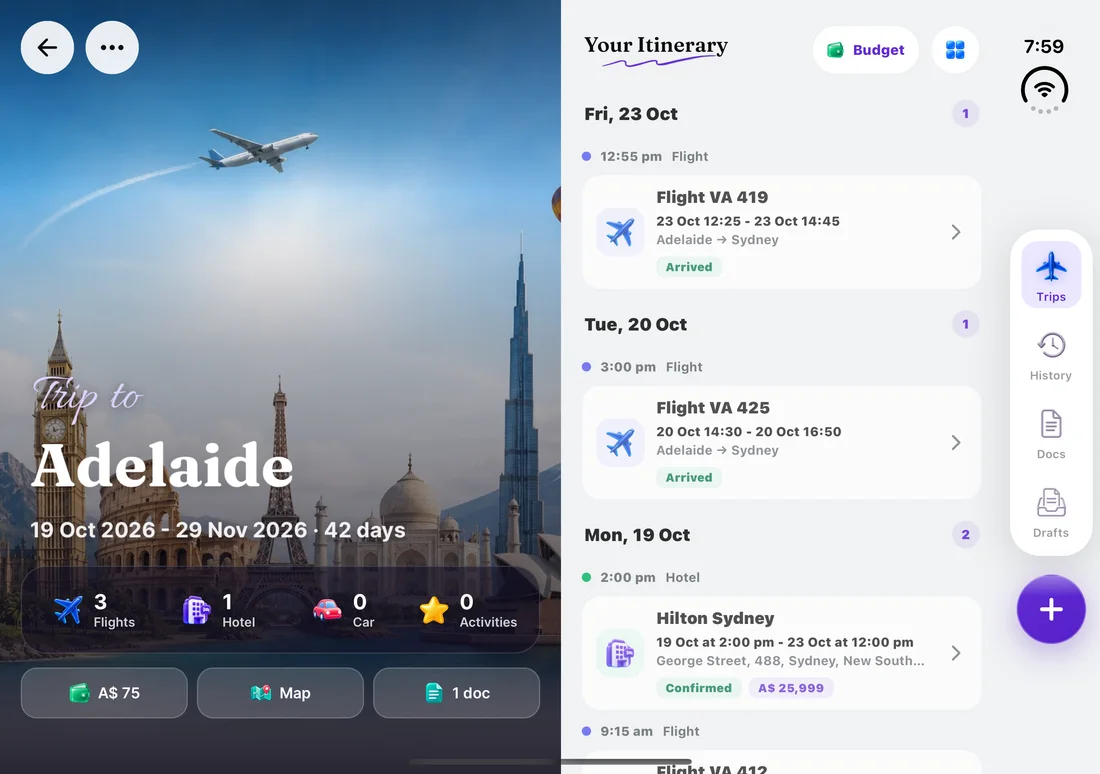
Open a trip with the phone held sideways and it becomes two pages. The left page is the cover: the destination photo, dates, counts of flights, hotels, cars and activities, and buttons for the budget, map and documents. The right page is the itinerary. The map, budget and documents slide in over the itinerary while the cover stays put.
Flights: board, map and detail
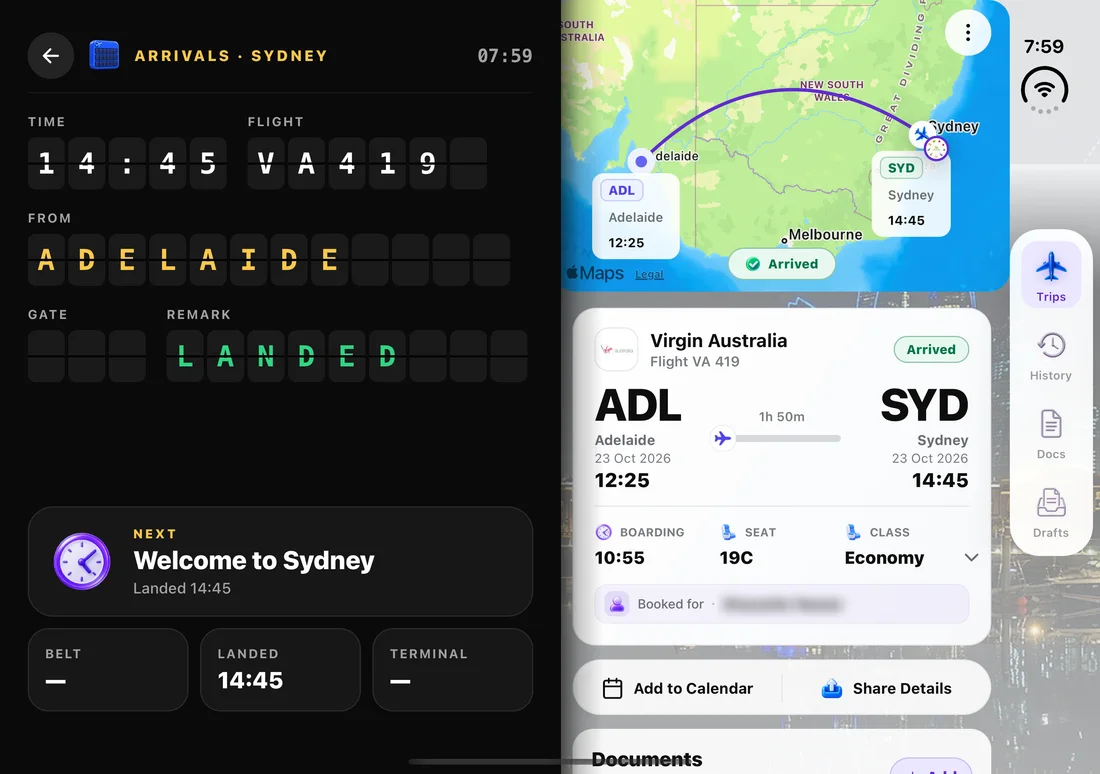
The flight page you were reading stays on the right. The left page shows the flight as an airport departures or arrivals board, with what's next and the belt and terminal underneath. The right page keeps the flight details with the route map, times, boarding time and seat.
Stand the phone half open on a table, like a small laptop, and TripCache splits the flight the other way: the top half is something to glance at, and the bottom half holds large controls you can reach without picking the phone up.
Documents, imports and travel history
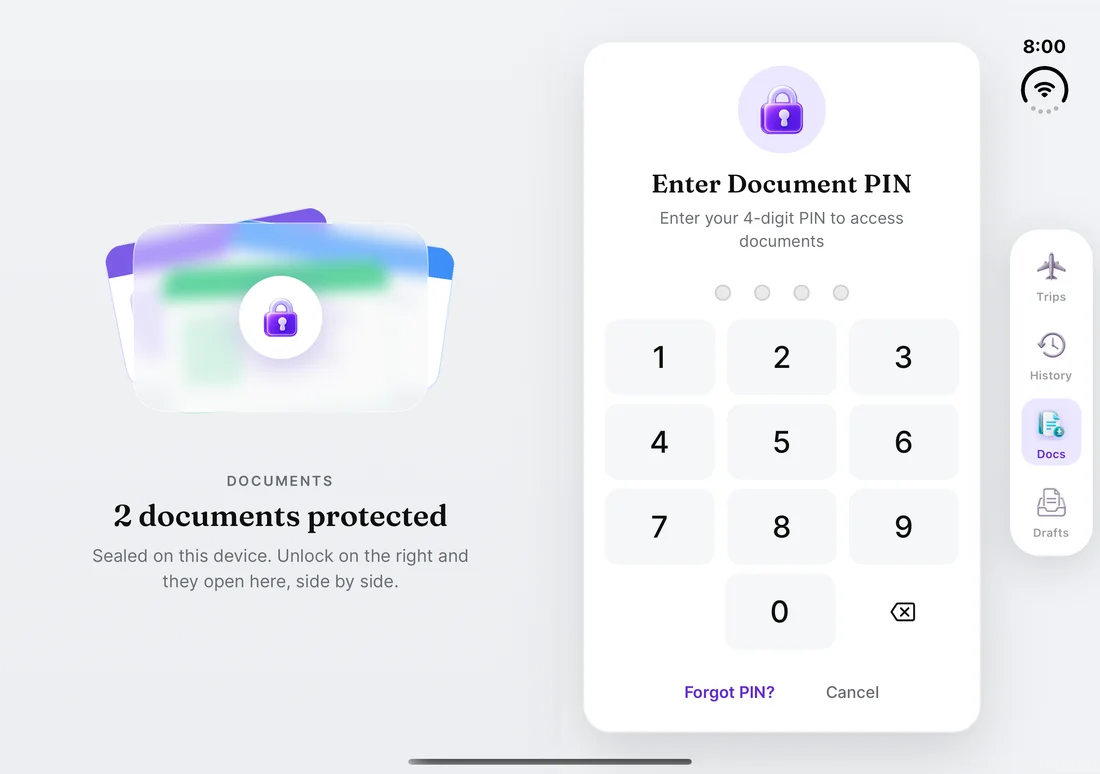
- Documents: your document list stays on one page; tap a passport or ticket and its details and preview open on the other.
- Imports: a forwarded confirmation's draft opens on one page while the list of drafts stays on the other, so you can check the booking against the email it came from.
- History: past trips are listed on one page, with a globe of everywhere you've been on the other.
Held upright
Open the Duo and hold it in portrait, and TripCache stacks the same two pages: what you were viewing on top, the new detail below, with the tab bar at the bottom as usual.
Tips for using a foldable on a trip
- Boarding pass on the outer screen. Scanners read it the same way, and you don't need to open the phone in a queue.
- Open it for the planning moments: checking a hotel against its confirmation, reading a long itinerary, or comparing a trip map with the day's plans.
- Keep documents available offline. A bigger screen doesn't help when there's no signal. See how to save travel documents offline.
Conclusion
The best iPhone Duo travel apps are the ones that treat opening the phone as a way to see more, not a reason to start over. Check for the Made for iPhone Duo label, then try the close-and-reopen test before you travel.
TripCache's Duo layouts are part of the regular app: there's no separate plan for them. Download TripCache to try it on your Duo, and see the best travel apps for the rest of your travel kit.
Frequently asked questions
What are the best travel apps for iPhone Duo?
For travel, Flighty and TripCache are built for the fold. Flighty is a detailed flight tracker with a larger map and an En Route Mode. TripCache organizes the whole booked trip and shows trips, flights and documents as two pages on the inner screen. Netflix also has a Duo version for the flight.
How do I know if an app is optimized for iPhone Duo?
Look for the Made for iPhone Duo label on the app's App Store page. On the phone, an optimized app fills the inner display. An app that hasn't been updated opens in a smaller box with black borders around it.
Do apps that aren't made for iPhone Duo still work?
Yes. They run normally on the outer display. On the inner display they appear in a box with black space around it, so they're usable but don't take advantage of the larger screen.
Does TripCache work on iPhone Duo?
Yes. TripCache has layouts for iPhone Duo. When you open the phone, the screen you were using stays in place and a second page appears beside it: a trip's cover next to its itinerary, a flight board next to the flight, or a document's details next to the document list.
Is TripCache's iPhone Duo layout a paid feature?
No. The Duo layouts are part of the regular TripCache app. TripCache Pro adds forwarded-email import, live flight status alerts, Live Activities and widgets, and connecting AI assistants such as ChatGPT and Claude.
Can I show my boarding pass on the iPhone Duo's outer screen?
Yes. The outer screen works like a regular iPhone, so a boarding pass in TripCache or Apple Wallet displays there for scanning. You don't need to open the phone at security or the gate.